
Kia Cadenza YG: Air Conditioning System / Condenser Repair procedures
Kia Cadenza YG 2016-2021 Service Manual / Heating,Ventilation, Air Conditioning / Air Conditioning System / Condenser Repair procedures
| Inspection |
| 1. |
Check the condenser fins for clogging and damage. If clogged,
clean them with water, and blow them with compressed air. If bent,
gently bend them using a screwdriver or pliers. |
| 2. |
Check the condenser connections for leakage, and repair or replace it, if required. |
| Replacement |
| 1. |
Recover the refrigerant with a recovery/recycling/charging station. |
| 2. |
Disconnect the negative (-) battery terminal. |
| 3. |
Remove the front bumper.
(Refer to the BD group - "Front Bumper") |
| 4. |
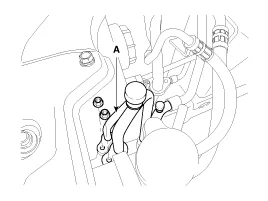
Remove the 2 nuts, and then disconnect the discharge line and liquid line (A) from the condenser.
|
| 5. |
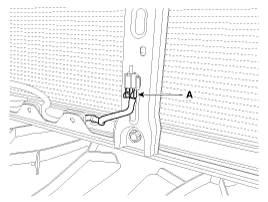
Disconnect the ambient temperature sensor connector (A).
|
| 6. |
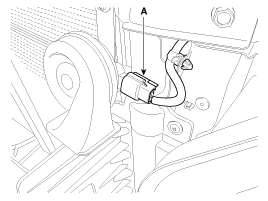
Disconnect the horn connector (A).
[LH]
[RH]
|

| 7. |
Remove the radiator upper brackat assembly (A) by loosening the mounting bolts.
|

| 8. |
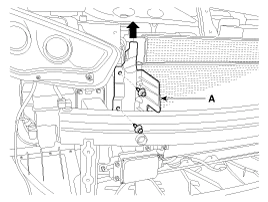
Remove the side air guard (A) by pulling it upwards.
[LH]
[RH]
|

| 9. |
Remove the condenser (A) from radiator.
|
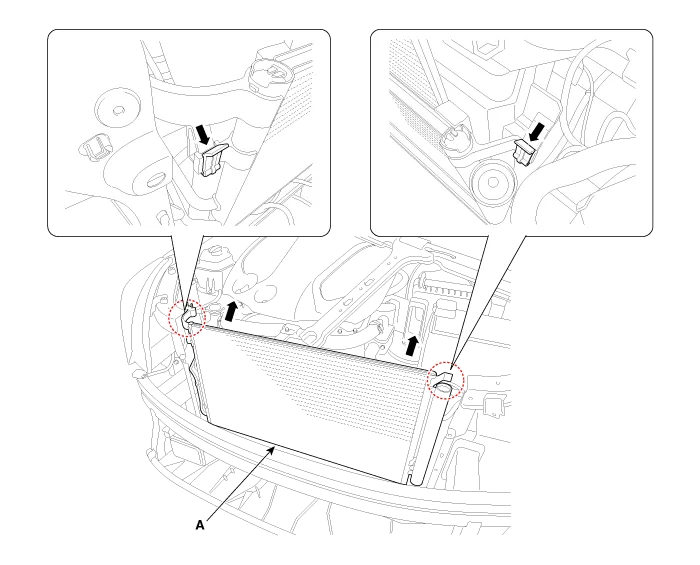
| 10. |
Install in the reverse order of removal, and note these items :
|
Component Location
Replacement 1. Remove the condenser, and then remove the bottom cap (B) with L wrench (A) from the condenser. Tightening torque : 9.8~14.7N.m (1.
Other information:
Kia Cadenza YG 2016-2021 Service Manual: Refrigerant line Repair procedures
Replacement 1. Discharge refrigerant from refrigeration system. 2. Replace faulty tube or hose. Cap the open fittings immediately to keep moisture or dirt out of the system. 3. Tighten joint of bolt or nut to specified torque.
Kia Cadenza YG 2016-2021 Service Manual: Mode Control Actuator Repair procedures
Inspection 1. Ignition "OFF” 2. Disconnect the connector of mode control actuator. 3. Verify that the mode control actuator operates to the defrost mode when connecting 12V to the terminal 3and grounding terminal 7. 4. Verify that the mode control actuator operates to the vent mode when connecting in the reverse.
Categories
- Manuals Home
- Kia Cadenza Owners Manual
- Kia Cadenza Service Manual
- Restraint
- Body Control Module (BCM) Description and Operation
- Engine Control / Fuel System
- New on site
- Most important about car

Copyright © 2026 www.kcadenzavg.com - 0.032