
Kia Cadenza YG: Timing System / Drive Belt Tensioner Components and Components Location
Kia Cadenza YG 2016-2021 Service Manual / Engine Mechanical System / Timing System / Drive Belt Tensioner Components and Components Location
| Components |
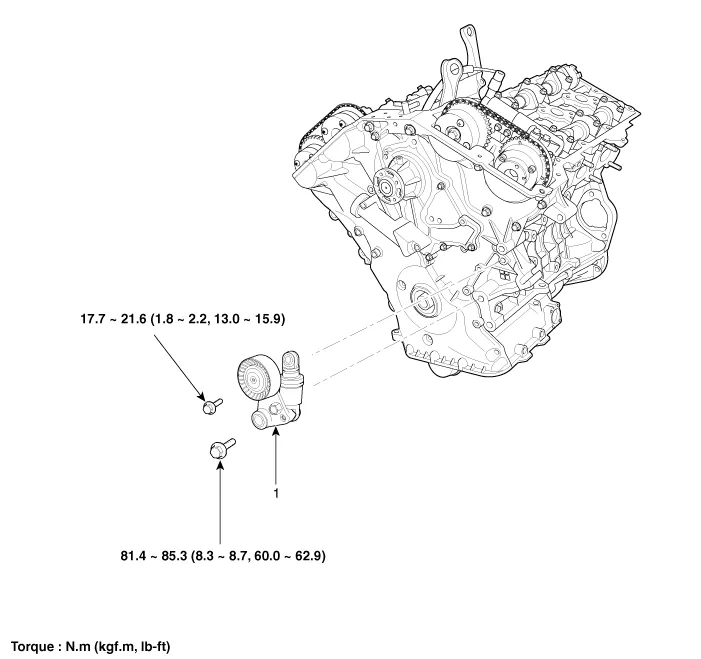
| 1. Drive belt tensioner |
Removal and Installation 1. Remove the drive belt. (Refer to Timing System - "Drive Belt") 2. Remove the drive belt idler (A). Tightening torque : 53.
Removal and Installation 1. Remove the drive belt idler. (Refer to Timing System - "Idler") 2. Remove the drive belt auto tensioner (A). Tightening torque Bolt (B) : 81.
Other information:
Kia Cadenza YG 2016-2021 Service Manual: Condenser Repair procedures
Inspection 1. Check the condenser fins for clogging and damage. If clogged, clean them with water, and blow them with compressed air. If bent, gently bend them using a screwdriver or pliers. 2. Check the condenser connections for leakage, and repair or replace it, if required.
Kia Cadenza YG 2016-2021 Service Manual: Intake Actuator Description and Operation
D
Categories
- Manuals Home
- Kia Cadenza Owners Manual
- Kia Cadenza Service Manual
- Timing Chain Repair procedures
- Automatic Transaxle System
- Schematic Diagrams
- New on site
- Most important about car

Copyright © 2026 www.kcadenzavg.com - 0.0299