
Kia Cadenza YG: Electro Chromic Inside Rear View Mirror / Description and Operation
Kia Cadenza YG 2016-2021 Service Manual / Body Electrical System / Electro Chromic Inside Rear View Mirror / Description and Operation
| Description |
The ECM (Electro Chromatic inside rear view Mirror) is for
dimming the reflecting light from a vehicle behind at night, in order
the user not to be dazzled by the light. The forward facing sensor
detects brightness of the surroundings, while the rearward looking
sensor the strength of the reflecting light so that adjusts the
reflexibility of the mirror in the range of 7~85%. But, when the reverse
gear is engaged, it stops functioning.
| 1. |
The forward facing sensor sees if the brightness of the surroundings is low enough for the mirror to operate its function. |
| 2. |
The rearward looking sensor detects glaring of the reflecting light from a vehicle behind. |
| 3. |
The ECM is darkened to the level as determined by the
rearward looking sensor. When the glaring is no longer detected, the
mirror stops functioning.
1. LED indicator
2. ON/OFF Switch
3. Rearward looking sensor
4. Forward facing sensor
|
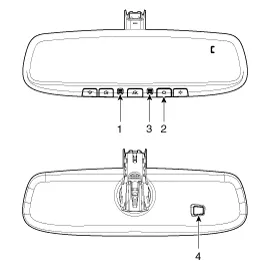
Automatic-dimming Function
To protect your vision during nighttime driving, your mirror
will automatically dim upon detecting glare from the vehicles traveling
behind you. The auto-dimming function can be controlled by the Dimming
ON/OFF Button :
| 1. |
Pressing and holding the Feature Control button for more than
3 but less than 6 seconds turns the auto-dimming function OFF which is
indicated by the green Status Indicator LED turning off. |
| 2. |
Pressing and holding the Feature Control button again for
more than 3 but less than 6 seconds turns the auto-dimming function ON
which is indicated by the green Status Indicator LED turning on.
|

Components
Inspection Check it by the procedure below to see if the function of the ECM is normal. 1. Turn the ignition key to the "ON" position. 2. Cover the front sensor to stop functioning.
Other information:
Kia Cadenza YG 2016-2021 Service Manual: Schematic Diagrams
Circuit Diagram SVM System Input/Output 1. Camera input ItemSpecificationLens angle of view190 degreesAngle of viewHorizontal186 degreesVertical135 degreesFunctionProvides the original image of the wide angle image (no additional function)Application locationSame camera applied to the front, rear, left and right 2.
Kia Cadenza YG 2016-2021 Service Manual: Components and Components Location
C
Categories
- Manuals Home
- Kia Cadenza Owners Manual
- Kia Cadenza Service Manual
- Body Control Module (BCM) Description and Operation
- Crankshaft Damper Pulley Components and Components Location
- Engine Mechanical System
- New on site
- Most important about car

Copyright © 2026 www.kcadenzavg.com - 0.0277