
Kia Cadenza YG: Fuel Delivery System / Fuel Pump Control Module (FPCM) Schematic Diagrams
| Circuit Diagram |
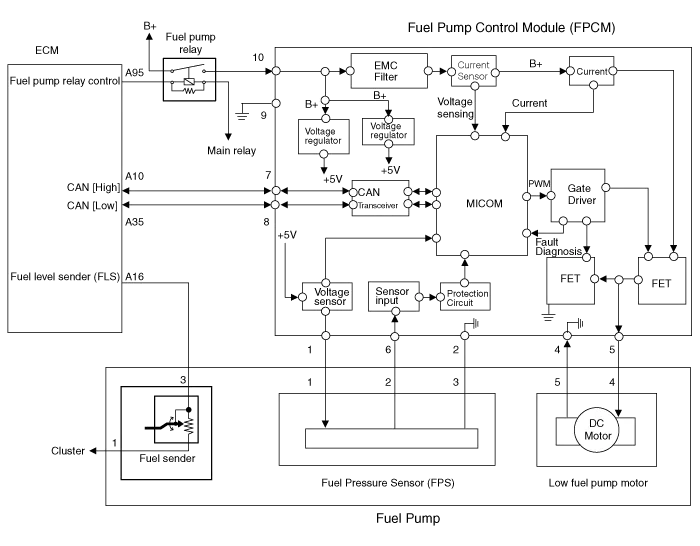
| Fuel Pressure Control Module (FPCM) Terminal And Input/Output signal |

| Pin No. | Description | Connected to |
| 1 | Fuel pressure sensor (FPS) power supply (+5V) | Fuel Pressure Sensor (FPS) |
| 2 | Fuel Pressure Sensor (FPS) Ground (-) | Fuel Pressure Sensor (FPS) |
| 3 | - | |
| 4 | Fuel pump DC motor (-) | Fuel Pump Motor |
| 5 | Fuel pump DC motor (+) | Fuel Pump Motor |
| 6 | Fuel pressure sensor (FPS) signal input | Fuel pressure sensor (FPS) |
| 7 | CAN [High] | ECM |
| 8 | CAN [Low] | ECM |
| 9 | Ground | Chassis Ground |
| 10 | Battery power (B+) | Fuel Pump Relay |
Specification ItemsSpecificationApplied Voltate (V)6~18Current Consumption (A)Max. 15Fuel Pressure StartMax. 600 KPa (Max. 6.1 kgf/cm², Max.
Removal 1. Turn the ignition switch OFF and disconnect the battery negative (-) cable. 2. Lift the vehicle. 3. Remove the fuel pump control module mounting bolts (A).
Other information:
Kia Cadenza YG 2016-2021 Service Manual: Parking Assist Sensor Repair procedures
Removal 1. Disconnect the negative (-) battery terminal. 2. Remove the rear bumper cover. (Refer to Body - "Rear Bumper Cover") 3. Disconnect the connector (A) from the parking assist sensor. 4. Pull out the sensor (A) by opening the sensor holder (B) out.
Kia Cadenza YG 2016-2021 Service Manual: Condenser Repair procedures
Inspection 1. Check the condenser fins for clogging and damage. If clogged, clean them with water, and blow them with compressed air. If bent, gently bend them using a screwdriver or pliers. 2. Check the condenser connections for leakage, and repair or replace it, if required.
Categories
- Manuals Home
- Kia Cadenza Owners Manual
- Kia Cadenza Service Manual
- Steering System
- Timing Chain Repair procedures
- Suspension System
- New on site
- Most important about car
