
Kia Cadenza YG: AVN System / Components and Components Location
| Components Location |
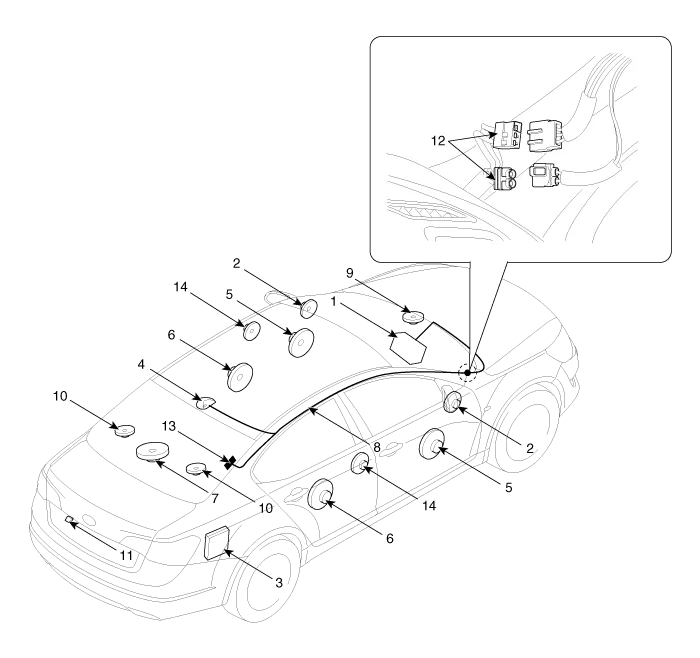
| 1. AVN (A/V & Navigation head unit) 2. Front tweeter speaker 3. External amplifier 4. Roof antenna 5. Front door speaker 6. Rear door speaker 7. Sub woofer speaker | 8. Antenna feeder cable 9. Front center speaker 10. Surround speaker 11. Back view camera 12. Feeder cable joint connector 13. Glass antenna (Radio) 14. Rear tweeter speaker |
Specifications AVN Head Unit ItemSpecificationPower sourceDC 14.4V (-) groundFrequency range / Channel spaceFM : 87.5 ~ 107.9 MHz / 200 KHzAM : 530 ~ 1710 KHz / 10 KHzTuning typePLL SYNTHESIZED TUNINGImpedance2 ohm x 4Antenna80 pF 75 OhmDark currentMax.
System Block Diagram
Other information:
Kia Cadenza YG 2016-2021 Service Manual: Repair procedures
Inspection Initialization and diagnosis sequence by using diagnostic equipment Below content summarize the procedure for A/S using Diagnostic equipment Download Parameter 1. Select "AFLS" menu after selecting a vehicle. 2. Select "Parameter download" menu for define a characteristc of vehicle.
Kia Cadenza YG 2016-2021 Service Manual: Auto defoging actuator Repair procedures
Inspection 1. Ignition "OFF”. 2. Disconnect the connector of auto defog control actuator. 3. Verify that the auto defog control actuator operates to the defrost ON mode when connecting 12V to the terminal 3 and grounding terminal 7. 4.
Categories
- Manuals Home
- Kia Cadenza Owners Manual
- Kia Cadenza Service Manual
- Engine Mechanical System
- Components and Components Location
- Engine Control / Fuel System
- New on site
- Most important about car
