
Kia Cadenza YG: Engine And Transmission Assembly / Engine Room Under Cover Components and Components Location
Kia Cadenza YG 2016-2021 Service Manual / Engine Mechanical System / Engine And Transmission Assembly / Engine Room Under Cover Components and Components Location
| Components |
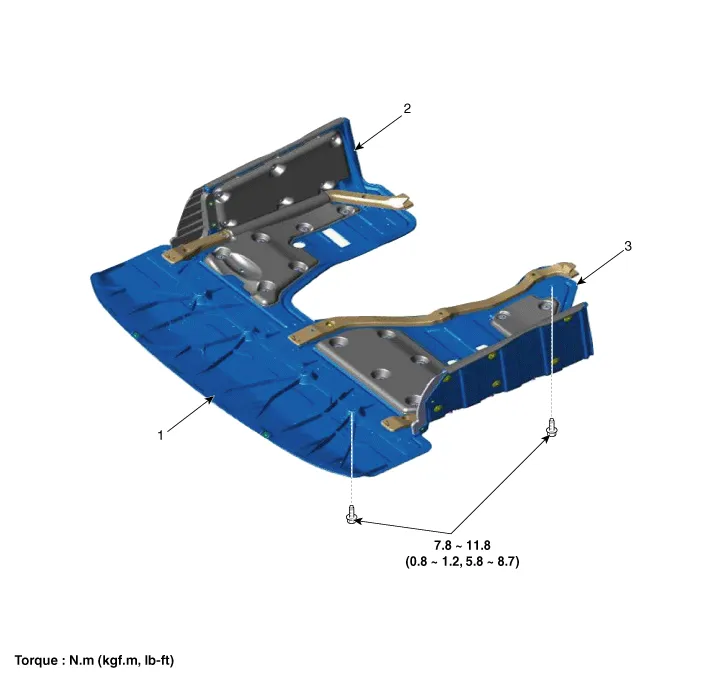
| 1. Engine room front under cover 2. Engine room RH side cover | 3. Engine room LH side cover |
Removal and Installation 1. Remove the engine cover (A). • Lift up the lower end of engine cover, then left and right alternately.
Removal and Installation 1. Remove the engine room front under cover (A) and the side covers (B). When removing the under covers (B), unfasten the mounting bracket bolts and then remove the under cover and mounting bracket assembly.
Other information:
Kia Cadenza YG 2016-2021 Service Manual: Components and Components Location
C
Kia Cadenza YG 2016-2021 Service Manual: Blower Unit Components and Components Location
Component Location Components 1. Duct Seal2. Duct Case3. Inlet Door4. Intake Actuator5. Inlet Duct Case (A)6. Climate control air filter7. Cluster Ionizer8. Climate control air filter Cover9. Blower Upper Case10. Blower Lower Case11. FET12. Resistor13.
Categories
- Manuals Home
- Kia Cadenza Owners Manual
- Kia Cadenza Service Manual
- Specifications
- General Information
- Schematic Diagrams
- New on site
- Most important about car

Copyright © 2026 www.kcadenzavg.com - 0.0212