
Kia Cadenza YG: SRSCM / Front Impact Sensor (FIS) Repair procedures
Kia Cadenza YG 2016-2021 Service Manual / Restraint / SRSCM / Front Impact Sensor (FIS) Repair procedures
| Removal |
|

| 1. |
Disconnect the battery negative cable, and wait for at least three minutes before beginning work. |
| 2. |
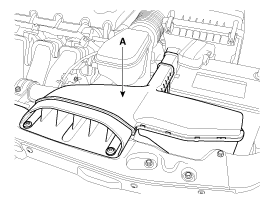
Remove the air duct (A).
|
| 3. |
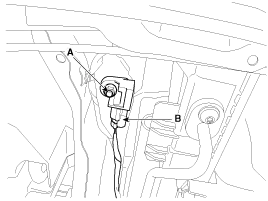
Remove the front impact sensor mounting nut (A).
|
| 4. |
Disconnect the front impact sensor connector (B). |
| 5. |
Remove the front impact sensor. |
| Installation |
|
| 1. |
Install the new front impact sensor. |
| 2. |
Tighten the front impact sensor mounting nut.
|
| 3. |
Connect the front impact sensor connector. |
| 4. |
Reconnect the battery negative cable. |
| 5. |
After installing the Front Impact Sensor, confirm proper system operation:
|
Description Side Impact Sensor (SIS) system consists of two P-SIS which are installed at each center of the front door module (LH and RH) and two SIS which are installed at each rear pillar nearby (LH and RH).
Categories
- Manuals Home
- Kia Cadenza Owners Manual
- Kia Cadenza Service Manual
- Battery Troubleshooting
- Timing Chain Repair procedures
- Restraint
- New on site
- Most important about car

Copyright © 2026 www.kcadenzavg.com - 0.027