
Kia Cadenza YG: IMS (Integrated Memory) / IMS Power Seat Control Repair procedures
Kia Cadenza YG 2016-2021 Service Manual / Body Electrical System / IMS (Integrated Memory) / IMS Power Seat Control Repair procedures
| Inspection |
| 1. |
Remove the IMS control switch connector (A).
|

| 2. |
With the IMS control switch in each position, make sure that
continuity exists between the terminals below. If continuity is not as
specified, replace the IMS control switch.
Driver Power Seat Control Switch (For IMS)
|

| Removal |
| 1. |
Disconnect the negative (-) battery terminal. |
| 2. |
Remove the switch (A) from seat side cover.
|

| 3. |
Remove the seat side cover (A).
(Refer to Body - "Front Seat")
|

| 4. |
Disconnect the IMS control switch connector (A).
|

| 5. |
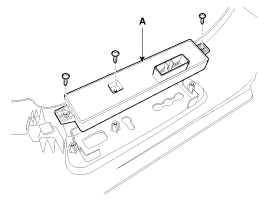
Loosen the IMS control switch (A) mounting screws (3EA).
|
| Installation |
|

| 1. |
Connect the connectors and reassemble the IMS control switch. |
| 2. |
Reassemble the seat side cover. |
Circuit diagram
Other information:
Kia Cadenza YG 2016-2021 Service Manual: Description and Operation
Description Back view camera will activate when the backup light is ON with the ignition switch ON and the shift lever in the R position. This system is a supplemental system that shows behind the vehicle through the ECM (Reverse Display Room Mirror) mirror or AVN head unit while backing-up.
Kia Cadenza YG 2016-2021 Service Manual: Troubleshooting
Troubleshooting Examples of False-Alarm Occurrence from system characteristics (It’s not a problem) – Characteristics of EM Wave : EM Waves are reflected against all material and especially metal very well. Reflections of EM Waves are varies with the shape of object.
Categories
- Manuals Home
- Kia Cadenza Owners Manual
- Kia Cadenza Service Manual
- Schematic Diagrams
- General Information
- Specifications
- New on site
- Most important about car

Copyright © 2026 www.kcadenzavg.com - 0.0283