
Kia Cadenza YG: IMS (Integrated Memory) / IMS Power Seat Control Schematic Diagrams
Kia Cadenza YG 2016-2021 Service Manual / Body Electrical System / IMS (Integrated Memory) / IMS Power Seat Control Schematic Diagrams
| Circuit diagram |
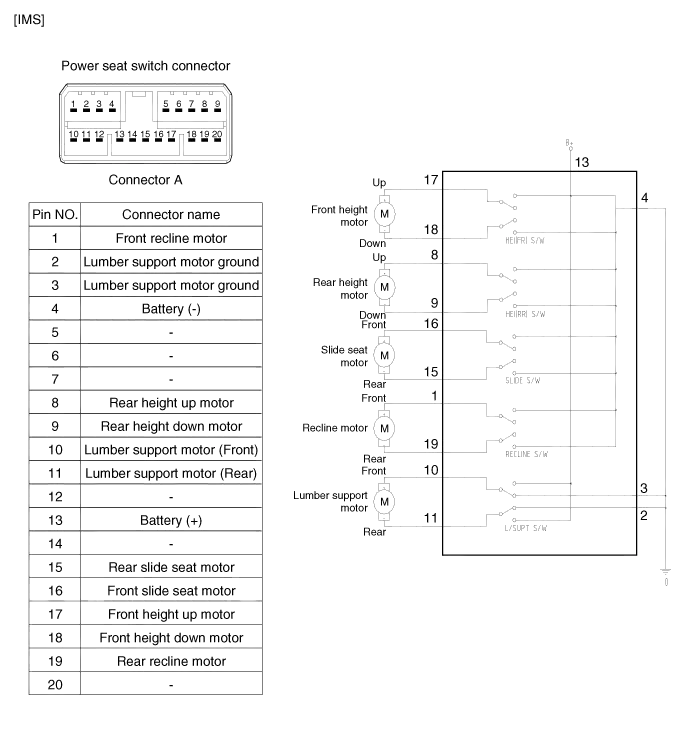
Inspection 1. Disconnect the IMS control switch connector. 2. With the power IMS control switch in each position, make sure that continuity exists between the terminals below.
Inspection 1. Remove the IMS control switch connector (A). 2. With the IMS control switch in each position, make sure that continuity exists between the terminals below.
Other information:
Kia Cadenza YG 2016-2021 Service Manual: Specifications
S
Kia Cadenza YG 2016-2021 Service Manual: Blind Spot Detection Radar Calibration Description and Operation
Description To sense the cars exactly in the next lane with the radar, the direction of the sensor and the direction of the vehicle have to align. This is BSD unit alignment. If this alignment is not performed as below illustration, the degradation of detection performance and the cause of false alarms.
Categories
- Manuals Home
- Kia Cadenza Owners Manual
- Kia Cadenza Service Manual
- Components and Components Location
- Suspension System
- General Information
- New on site
- Most important about car

Copyright © 2026 www.kcadenzavg.com - 0.0203