
Kia Cadenza YG: IMS (Integrated Memory) / IMS Control Switch Repair procedures
Kia Cadenza YG 2016-2021 Service Manual / Body Electrical System / IMS (Integrated Memory) / IMS Control Switch Repair procedures
| Inspection |
| 1. |
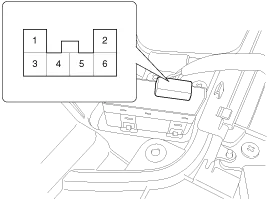
Disconnect the IMS control switch connector.
|
| 2. |
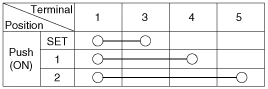
With the power IMS control switch in each position, make sure
that continuity exists between the terminals below. If continuity is
not as specified, replace the IMS control switch.
|
| Removal |
| 1. |
Disconnect the negative (-) battery terminal. |
| 2. |
Remove the front door trim panel.
(Refer to Body - "Front Door") |
| 3. |
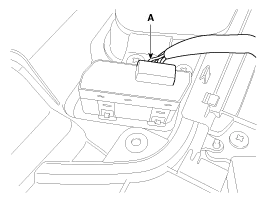
Remove the IMS switch connector (A) from door trim panel.
|
| 4. |
Remove the IMS control switch. |
| Installation |
|

| 1. |
Connect the connectors and reassemble the IMS control switch. |
| 2. |
Reassemble the front door trim panel. |
Circuit diagram
Circuit diagram
Other information:
Kia Cadenza YG 2016-2021 Service Manual: Pantoscopic Camera Components and Components Location
C
Kia Cadenza YG 2016-2021 Service Manual: Specifications
Specification Air Conditioner ItemSpecificationCompressorType6VSX16Oil type & CapacityPAG OIL 100±10Pulley type6PK-TYPEDisplacement160cc/revCondenserHeat rejection14,400 ±5% kcal/hrA/C Pressure transducerThe method to measure the pressureVoltage= 0.
Categories
- Manuals Home
- Kia Cadenza Owners Manual
- Kia Cadenza Service Manual
- Brake System
- Body Control Module (BCM) Description and Operation
- Suspension System
- New on site
- Most important about car

Copyright © 2026 www.kcadenzavg.com - 0.0191