
Kia Cadenza YG: MTS System / Telemetics Unit (TMU) Components and Components Location
| Component |
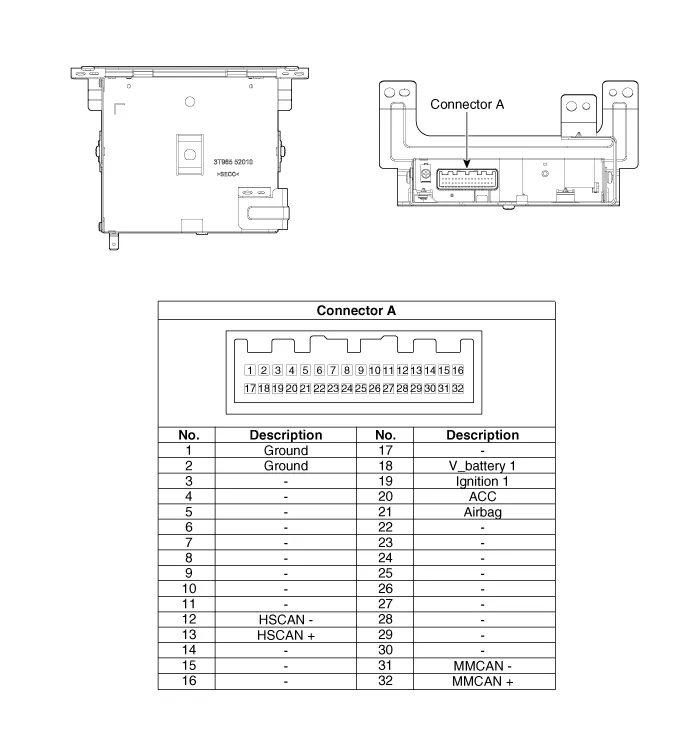
| No. | Pin Name | Type | From | To | Description (Wiring Spec.) |
| 1 | GND | DC Ground | TMU | Battery | Connected to battery ground |
| 2 | GND | DC Ground | TMU | Battery | Connected to battery ground |
| 3 | - | - | - | - | - |
| 4 | - | - | - | - | - |
| 5 | - | - | - | - | - |
| 6 | - | - | - | - | - |
| 7 | - | - | - | - | - |
| 8 | - | - | - | - | - |
| 9 | - | - | - | - | - |
| 10 | - | - | - | - | - |
| 11 | - | - | - | - | - |
| 12 | HS CAN (-) | Data I/O | BUS | BUS | High Speed CAN bus low |
| 13 | HS CAN (+) | Data I/O | BUS | BUS | High Speed CAN bus high |
| 14 | - | - | - | - | - |
| 15 | - | - | - | - | - |
| 16 | - | - | - | - | - |
| 17 | - | - | - | - | - |
| 18 | V battery 1 | DC Input | Battery | TMU | DC level input from battery Supply power to TMU |
| 19 | Ignition 1 | Data Input | Junction Box | TMU | Vehicle Key mode status |
| 20 | ACC | Data Input | Junction Box | TMU | Vehicle Key mode status |
| 21 | Airbag | Data Input | ACU | TMU | Airbag status data from ACU |
| 22 | - | - | - | - | - |
| 23 | - | - | - | - | - |
| 24 | - | - | - | - | - |
| 25 | - | - | - | - | - |
| 26 | - | - | - | - | - |
| 27 | - | - | - | - | - |
| 28 | - | - | - | - | - |
| 29 | - | - | - | - | - |
| 30 | - | - | - | - | - |
| 31 | MM CAN (-) | Data I/O | BUS | BUS | Low Speed CAN bus low |
| 32 | MM CAN (+) | Data I/O | BUS | BUS | Low Speed CAN bus high |
Description The Vehicle Information System is a Telematics service that ensures comfortable and enjoyable driving by providing safety, security, and vehicle diagnostic information, with the option of using your smartphone.
Removal • Take care not to scratch the crash pad and related parts. 1. Disconnect the negative (-) battery terminal.
Other information:
Kia Cadenza YG 2016-2021 Service Manual: Surround View Monitoring Unit Repair procedures
Removal 1. Disconnect the negative (-) battery terminal. 2. Remove the glove box housing. (Refer to Body - "Glove Box Housing") 3. Remove the SVM unit (B) after disconnecting the connectors (A) and mounting bolts. Installation 1. Install the SVM unit.
Kia Cadenza YG 2016-2021 Service Manual: Compressor Repair procedures
Removal 1. If the compressor is marginally operable, run the engine at idle speed, and let the air conditioning work for a few minutes, then shut the engine off. 2. Disconnect the negative cable from the battery. 3. Recover the refrigerant with a recovery/charging station.
Categories
- Manuals Home
- Kia Cadenza Owners Manual
- Kia Cadenza Service Manual
- Suspension System
- Engine Electrical System
- Engine Mechanical System
- New on site
- Most important about car
