
Kia Cadenza YG: Lubrication System / Oil Filter Body Repair procedures
Kia Cadenza YG 2016-2021 Service Manual / Engine Mechanical System / Lubrication System / Oil Filter Body Repair procedures
| Removal and Installation |
| 1. |
Drain engine oil.
(Refer to Lubrication System - "Engine Oil") |
| 2. |
Remove the water center pipe.
(Refer to Cooling System - "Water Temperature Control Assembly") |
| 3. |
Wait for 5 minutes after loosening the oil filter cap to drain well the oil in the oil filter. |
| 4. |
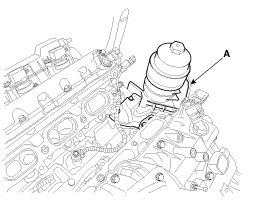
Remove the oil filter body (A).
|

| 5. |
Install in the reverse order of removal. |
| 6. |
Start engine and check for oil leaks. |
| 7. |
Recheck the engine oil level. |
Components 1. Oil filter body2. Gasket
Components 1. Upper oil pan2. Lower oil pan3. Drain plug4. Drain plug gasket
Other information:
Kia Cadenza YG 2016-2021 Service Manual: Description and Operation
Description Back view camera will activate when the backup light is ON with the ignition switch ON and the shift lever in the R position. This system is a supplemental system that shows behind the vehicle through the ECM (Reverse Display Room Mirror) mirror or AVN head unit while backing-up.
Kia Cadenza YG 2016-2021 Service Manual: Power Mosfet Repair procedures
Inspection 1. Ignition "ON" 2. Manually operate the control switch and measure the voltage of blower motor. 3. Select the control switch to raise voltage until high speed. Specification FanMotor VoltageManualFirst speed3.8 ±0.5VSecond speed5.
Categories
- Manuals Home
- Kia Cadenza Owners Manual
- Kia Cadenza Service Manual
- Battery Troubleshooting
- Emission Control System
- Schematic Diagrams
- New on site
- Most important about car

Copyright © 2026 www.kcadenzavg.com - 0.0231