
Kia Cadenza YG: Smart key System / Smart key unit Schematic Diagrams
| Circuit Diagram |

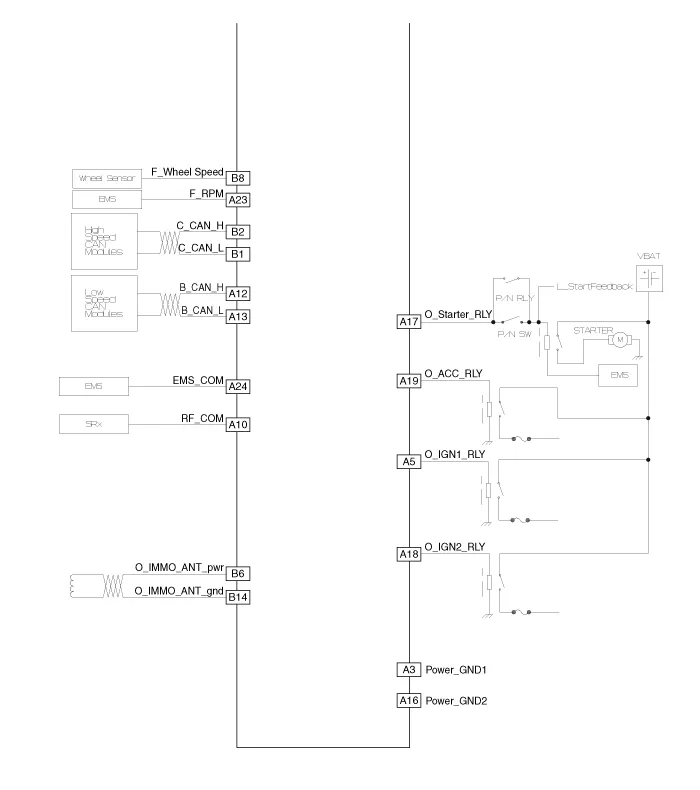
Component (1) Connector Pin Information No.Connector A (26 pins)Connector B (16 pins)Connector C (22 pins)1VBAT loadC CAN lowSSB illumination ground2-C CAN high-3Power ground 1-SSB LED OFF4IGN 1-Interior antenna #2 power5IGN1 relayBrake switchInterior antenna #1 power6ACCImmobilizer antenna power-7IGN 2--8SSB switch 2Wheel speedTrunk antenna power9-Driver toggle buttonBumper antenna power10RF COM-Assist side antena power11--Driver side antenna power12B CAN highP position/ Clutch switchSSB LED IGN13B CAN lowStart feedbackSSB illumination power14VBAT CPUImmobilizer antenna ground-15--Interior antenna #2 ground16Power ground 2SSB LED ACCInterior antenna #1 ground17Starter relay -18IGN2 relay-19ACC relayTrunk antenna ground20-Bumper antenna ground21-Assist side antena ground22-Driver side antenna ground23RPM 24EMS COM25SSB switch 126Assist toggle button Component (2)
Inspection Smart Key Unit – Refer to the BE group - inspection / self diagnosis with GDS. Smart Key Switch – Refer to the BE group - inspection / self diagnosis with GDS.
Other information:
Kia Cadenza YG 2016-2021 Service Manual: Blind Spot Detection Unit Repair procedures
Removal 1. Disconnect the negative (-) battery terminal. 2. Remove the rear bumper. (Refer to Body - "Rear Bumper") 3. Remove the BSD unit (A) after loosening the mounting screws. Take care not to separate the bracket from rear bumper when removing the BSD sensor.
Kia Cadenza YG 2016-2021 Service Manual: Temperature Control Actuator Repair procedures
Inspection 1. Ignition "OFF" 2. Disconnect the connector of temperature control actuator. 3. Verify that the temperature control actuator operates to the hot position when connecting 12V to the terminal 3 and grounding terminal 7. Verify that the temperature control actuator operates to the cool position when connecting in the rev
Categories
- Manuals Home
- Kia Cadenza Owners Manual
- Kia Cadenza Service Manual
- Brake System
- Schematic Diagrams
- Timing Chain Repair procedures
- New on site
- Most important about car
