
Kia Cadenza YG: IMS (Integrated Memory) / IMS Control Switch Repair procedures
Kia Cadenza YG 2016-2021 Service Manual / Body Electrical System / IMS (Integrated Memory) / IMS Control Switch Repair procedures
| Inspection |
| 1. |
Disconnect the IMS control switch connector.
|
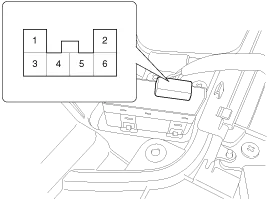
| 2. |
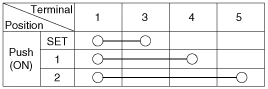
With the power IMS control switch in each position, make sure
that continuity exists between the terminals below. If continuity is
not as specified, replace the IMS control switch.
|
| Removal |
| 1. |
Disconnect the negative (-) battery terminal. |
| 2. |
Remove the front door trim panel.
(Refer to Body - "Front Door") |
| 3. |
Remove the IMS switch connector (A) from door trim panel.
|
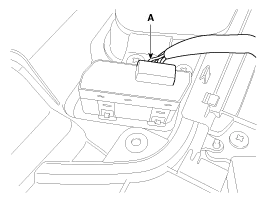
| 4. |
Remove the IMS control switch. |
| Installation |
|

| 1. |
Connect the connectors and reassemble the IMS control switch. |
| 2. |
Reassemble the front door trim panel. |
Circuit diagram
Circuit diagram
Other information:
Kia Cadenza YG 2016-2021 Service Manual: Refrigerant line Repair procedures
Replacement 1. Discharge refrigerant from refrigeration system. 2. Replace faulty tube or hose. Cap the open fittings immediately to keep moisture or dirt out of the system. 3. Tighten joint of bolt or nut to specified torque.
Kia Cadenza YG 2016-2021 Service Manual: Blower Resistor Repair procedures
Inspection 1. Measure terminal - to - terminal resistance of blower resistor. 2. If measure resistance isnot within specification, the blower resistor must be replaced. Replacement 1. Disconnect the negative (-) battery terminal. 2. Remove the crash pad lower cover (A) and then disconnect the connector (B).
Categories
- Manuals Home
- Kia Cadenza Owners Manual
- Kia Cadenza Service Manual
- Automatic Transaxle System
- Mode Control Actuator Repair procedures
- Battery Troubleshooting
- New on site
- Most important about car

Copyright © 2026 www.kcadenzavg.com - 0.0235