
Kia Cadenza YG: Audio / Audio Unit Components and Components Location
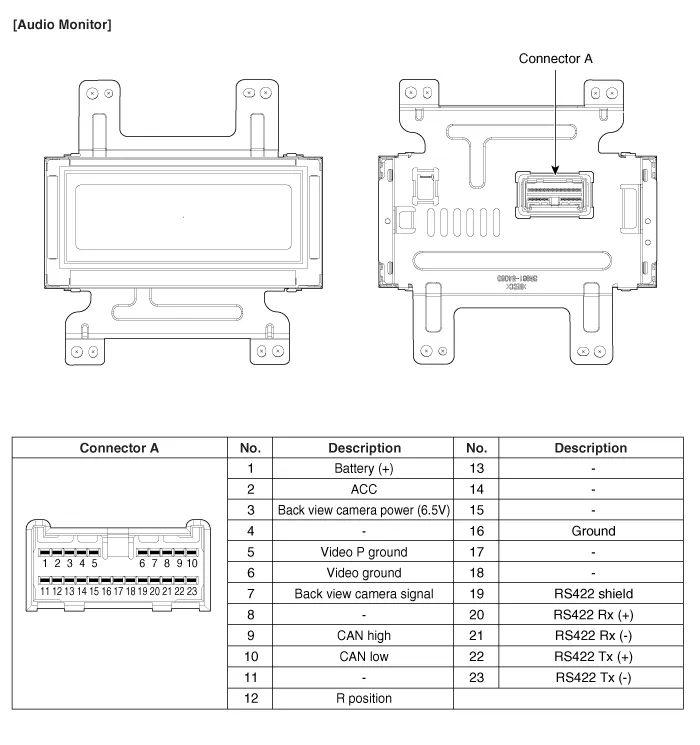
| Components |

| Pin No. | Connector A | Connector B | Connector C |
| 1 | Rear left speaker (+) | CAN high | Power ground |
| 2 | Front left speaker (+) | - | - |
| 3 | Front right speaker (+) | - | - |
| 4 | Rear right speaker (+) | Steering wheel remote | - |
| 5 | - | - | - |
| 6 | - | USB D (+) | - |
| 7 | - | USB/iPod VDD | Monitor Rx DP |
| 8 | Illumination (+) | AUX right input | Monitor Rx DN |
| 9 | Detent | AUX ground | - |
| 10 | Rear left speaker (-) | MIC (+) (Bluetooth) | - |
| 11 | Front left speaker (-) | ACC | - |
| 12 | Front right speaker (-) | Battery (+) | R Detect |
| 13 | Rear right speaker (-) | CAN low | - |
| 14 | - | - | - |
| 15 | - | - | Monitor Tx DN |
| 16 | - | Speed | Monitor Tx DP |
| 17 | Illumination (-) | Remote ground | |
| 18 | Remote antenna | USB D (-) | |
| 19 | | iPod/USB ground | |
| 20 | AUX Detect | ||
| 21 | AUX left input | ||
| 22 | MIC (-) (Bluetooth) | ||
| 23 | - | ||
| 24 | Power ground |
Component Location 1. Audio unit2. Front tweeter speaker3. Glass antenna amplifier (Diversity type)4. Front door speaker5. Rear speaker6. Antenna feeder cable7.
Removal Audio Head Unit • Take care not to scratch the center fascia panel and related parts. • Eject all the disc before removing the audio unit to prevent damaging the CD player''s load mechanism.
Other information:
Kia Cadenza YG 2016-2021 Service Manual: Photo Sensor Repair procedures
Inspection 1. Ignition "ON" 2. Using the scan tool. 3. Emit intensive light toward photo sensor using a lamp, and check the output voltage change. 4. The voltage will rise with higher intensive light and reduce with lower intensive light.
Kia Cadenza YG 2016-2021 Service Manual: Power Mosfet Repair procedures
Inspection 1. Ignition "ON" 2. Manually operate the control switch and measure the voltage of blower motor. 3. Select the control switch to raise voltage until high speed. Specification FanMotor VoltageManualFirst speed3.8 ±0.5VSecond speed5.
Categories
- Manuals Home
- Kia Cadenza Owners Manual
- Kia Cadenza Service Manual
- Emission Control System
- Steering System
- Crankshaft Damper Pulley Components and Components Location
- New on site
- Most important about car
