
Kia Cadenza YG: Interior / Console Repair procedures
Kia Cadenza YG 2016-2021 Service Manual / Body (Interior and Exterior) / Interior / Console Repair procedures
| Replacement |
Floor Console Replacement
|

| 1. |
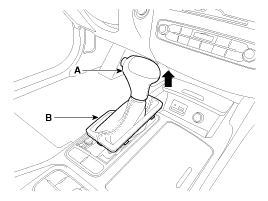
Using a screwdriver or remover, remove the gear boots (B). |
| 2. |
To remove the gear knob (A) and gear boots (B) pull both of it up.
|
| 3. |
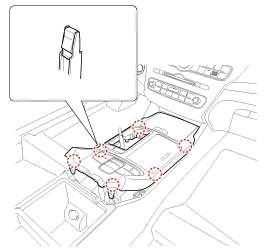
Using a screwdriver or remover, remove the floor console upper cover (A).
|
| 4. |
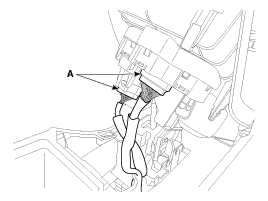
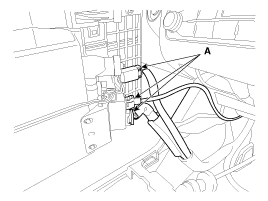
Disconnect the connectors (A) from the floor console upper cover .
[Rear]
[Front]
|
| 5. |
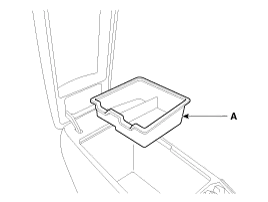
Remove the console armrest tray (A).
|
| 6. |
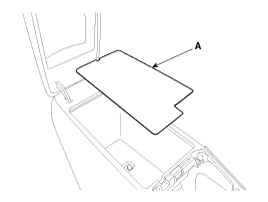
Remove the console tray met (A).
|
| 7. |
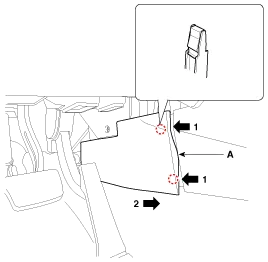
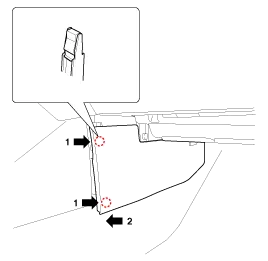
Using a screwdriver or remover, remove the console side cover (A).
[LH]
[RH]
|
| 8. |
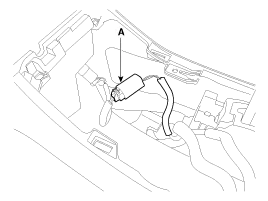
Disconnect the rear power outlet connector (A).
|
| 9. |
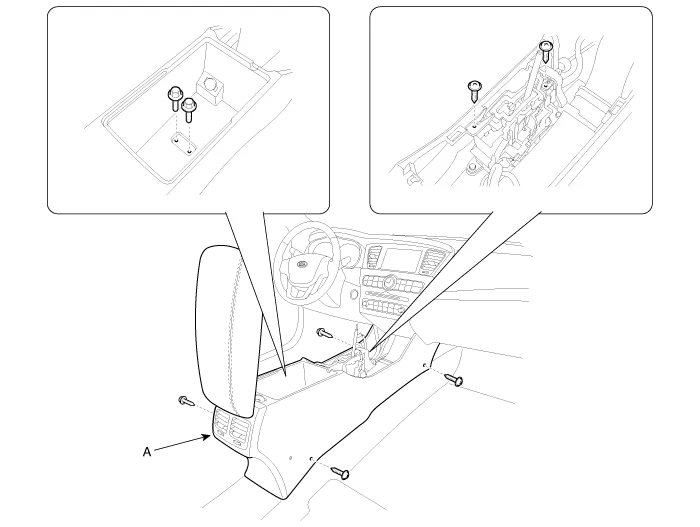
After loosening the mounting screws and bolts, then remove the floor console assembly (A).
|
| 10. |
Installation is the reverse of removal.
|
Console Armrest Replacement
|
| 1. |
Remove the floor console assembly. |
| 2. |
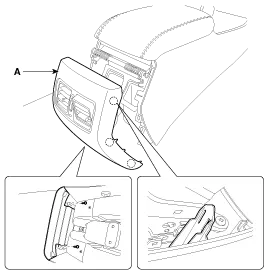
After loosening the mounting screws, then remove the rear console cover (A).
|
| 3. |
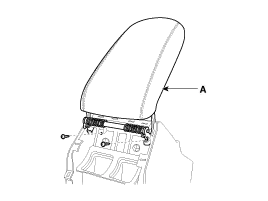
After loosening the mounting screws, then remove the console armrest (A).
|
| 4. |
Installation is the reverse of removal.
|
Components 1. Gear knob & boots 2. Floor console upper cover3. Floor console upper cover tray4. Console side cover [LH]5. Console side cover [RH]6.
Components 1. Main crash pad assembly2. Crash pad side cover3. Side airvent duct4. Crash pad garnish (LH)5. Cluster fascia panel6. Shroud upper panel7.
Other information:
Kia Cadenza YG 2016-2021 Service Manual: Immobilizer Control Unit Repair procedures
Removal 1. Disconnect the negative (-) battery terminal. 2. Remove the crash pad lower panel. (Refer to Body - "Crash Pad") 3. Disconnect the 5P connector of the SMARTRA unit and then remove the SMARTRA unit (A) after loosening the bolt. Installation 1.
Kia Cadenza YG 2016-2021 Service Manual: Specifications
S
Categories
- Manuals Home
- Kia Cadenza Owners Manual
- Kia Cadenza Service Manual
- Schematic Diagrams
- Suspension System
- Crankshaft Damper Pulley Components and Components Location
- New on site
- Most important about car

Copyright © 2026 www.kcadenzavg.com - 0.0231