
Kia Cadenza YG: Engine And Transmission Assembly / Engine Room Under Cover Components and Components Location
| Components |
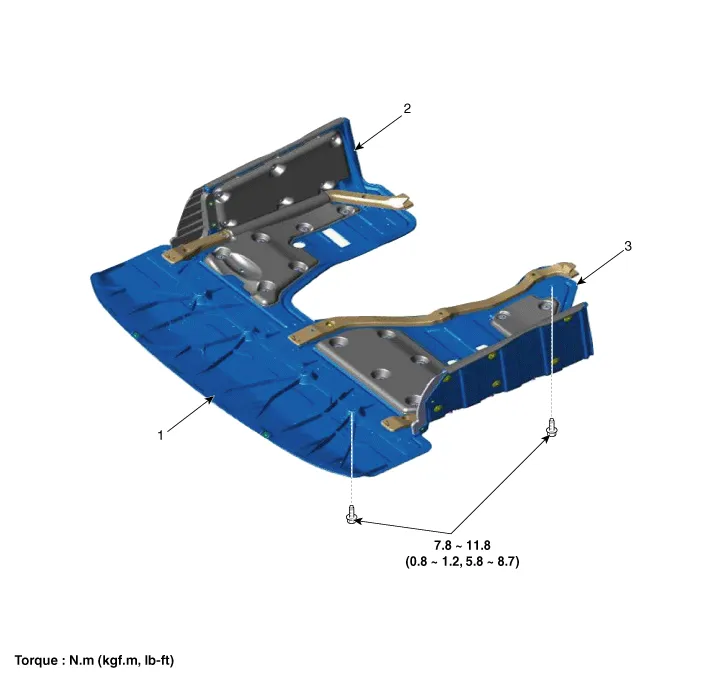
| 1. Engine room front under cover 2. Engine room RH side cover | 3. Engine room LH side cover |
Removal and Installation 1. Remove the engine cover (A). • Lift up the lower end of engine cover, then left and right alternately.
Removal and Installation 1. Remove the engine room front under cover (A) and the side covers (B). When removing the under covers (B), unfasten the mounting bracket bolts and then remove the under cover and mounting bracket assembly.
Other information:
Kia Cadenza YG 2016-2021 Service Manual: Repair procedures
Removal 1. Remove the trunk trim in the trunk after removing the screws and clips. (Refer to Body - "Trunk") 2. Remove the camera holder (A) as shown arrow direction, and then remove the back view camera (B). Installation 1. Install the back view camera and camera holder.
Kia Cadenza YG 2016-2021 Service Manual: Photo Sensor Description and Operation
Description 1. The photo sensor is located at the center of defrost nozzle. 2. The photo sensor contains a photovoltaic (sensitive to sunlight) diode. The solar radiation received by its light receiving portion, generates an electromotive force in proportion to the amount of radiation received which is transferred to the automatic tem
Categories
- Manuals Home
- Kia Cadenza Owners Manual
- Kia Cadenza Service Manual
- Body Electrical System
- Schematic Diagrams
- Battery Troubleshooting
- New on site
- Most important about car
