
Kia Cadenza YG: Power Door Locks / Power Door Lock Actuators Repair procedures
Kia Cadenza YG 2016-2021 Service Manual / Body Electrical System / Power Door Locks / Power Door Lock Actuators Repair procedures
| Inspection |
Front Door Lock Actuator Inspection
| 1. |
Remove the front door trim.
(Refer to Body - "Front Door") |
| 2. |
Remove the front door module. |
| 3. |
Disconnect the 6P connector from the actuator.
|

| 4. |
Check actuator operation by connecting power and ground
according to the table. To prevent damage to the actuator, apply battery
voltage only momentarily.
|

Rear Door Lock Actuator Inspection
| 1. |
Remove the rear door trim.
(Refer to Body - "Rear Door") |
| 2. |
Remove the rear door module. |
| 3. |
Disconnect the 6P connector from the actuator.
|
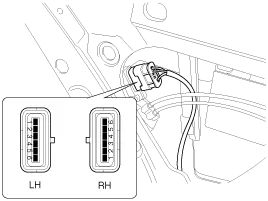
| 4. |
Check actuator operation by connecting power and ground
according to the table. To prevent damage to the actuator, apply battery
voltage only momentarily.
|

Trunk Lid Release Actuator Inspection
| 1. |
Remove the trunk lid trim panel.
(Refer to Body - "Trunk Lid") |
| 2. |
Disconnect the 3P connector from the actuator.
|
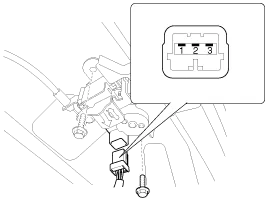
| 3. |
Check actuator operation by connecting power and ground
according to the table. To prevent damage to the actuator, apply battery
voltage only momentarily.
|

Front Door Lock Switch Inspection
| 1. |
Remove the front door trim panel.
(Refer to Body - "Front Door") |
| 2. |
Remove the front door module. |
| 3. |
Disconnect the 6P connector from the actuator.
|
| 4. |
Check for continuity between the terminals in each switch position when inserting the key into the door according to the table.
|

Rear Door Lock Switch Inspection
| 1. |
Remove the rear door trim panel.
(Refer to Body - "Rear Door") |
| 2. |
Remove the rear door module. |
| 3. |
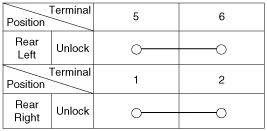
Disconnect the 6P connector from the actuator.
|
| 4. |
Check for continuity between the terminals in each switch position according to the table.
|
Trunk Lid Open Switch Inspection
| 1. |
Remove the trunk lid trim.
(Refer to Body - "Trunk Lid") |
| 2. |
Disconnect the 3P connector from the actuator.
|
| 3. |
Check for continuity between the terminals in each switch position according to the table.
|

Component Location 1. Driver power window switch2. Door lock switch3. IPM(Intelligent intergrated Platform Module)4. Front door lock actuator5. Rear door lock actuator6.
Inspection Diagnosis With GDS 1. It will be able to diagnose defects of DDM/ADM with GDS quickly. GDS can operates actuator forcefully, input/output value monitoring and self diagnosis.
Other information:
Kia Cadenza YG 2016-2021 Service Manual: Blind Spot Detection Switch Repair procedures
Removal 1. Disconnect the negative (-) battery terminal. 2. Remove the passenger compartment junction box cover. 3. Remove the driver side cover (A). 4. Remove the crash pad side switch assembly (A) by pushing it through side cover hole.
Kia Cadenza YG 2016-2021 Service Manual: Special Service Tools
S
Categories
- Manuals Home
- Kia Cadenza Owners Manual
- Kia Cadenza Service Manual
- Schematic Diagrams
- Body Electrical System
- Restraint
- New on site
- Most important about car

Copyright © 2026 www.kcadenzavg.com - 0.0254