
Kia Cadenza YG: Engine Control System / Accelerator Position Sensor (APS) Schematic Diagrams
| Circuit Diagram |
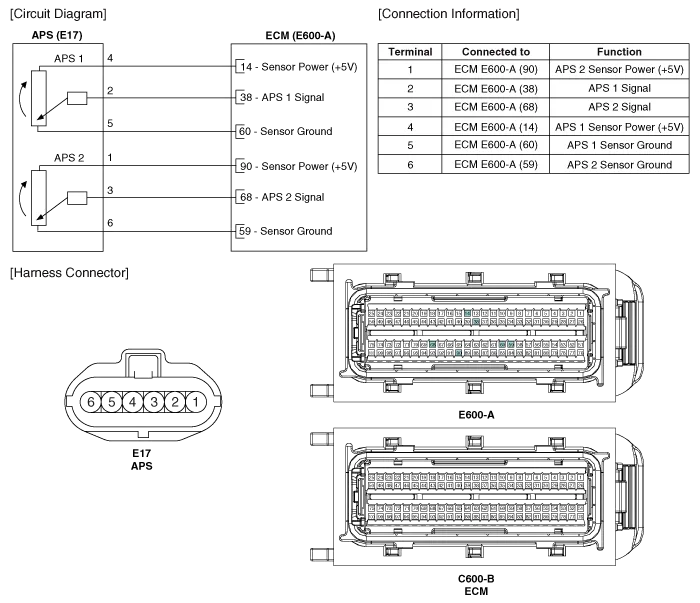
Specification AcceleratorPositionOutput Voltage (V)APS1APS2C.T0.7 ~ 0.80.29 ~ 0.46W.O.T3.85 ~ 4.351.93 ~ 2.18
Inspection 1. Connect the GDS on the Data Link Connector (DLC). 2. Turn the ignition switch ON. 3. Measure the output voltage of the APS 1 and 2 at C.
Other information:
Kia Cadenza YG 2016-2021 Service Manual: Height Sensor Repair procedures
Removal Height Sensor 1. Disconnect the negative (-) battery terminal. 2. Remove the height sensor linkage (A) installed on the front axle and rear axle. [Front] [Rear] Installation Height Sensor 1. Install the height sensor assembly after connecting the connector.
Kia Cadenza YG 2016-2021 Service Manual: Blower Motor Repair procedures
Inspection 1. Connect the battery voltage and check the blower motor rotation. 2. If the blower motor voltage is not operated well, substitute with a known-good blower motor and check for proper operation. 3. If the problem is corrected, replace the blower motor.
Categories
- Manuals Home
- Kia Cadenza Owners Manual
- Kia Cadenza Service Manual
- Components and Components Location
- Schematic Diagrams
- Automatic Transaxle System
- New on site
- Most important about car
