
Kia Cadenza YG: Engine Control System / Engine Coolant Temperature Sensor (ECTS) Repair procedures
Kia Cadenza YG 2016-2021 Service Manual / Engine Control / Fuel System / Engine Control System / Engine Coolant Temperature Sensor (ECTS) Repair procedures
| Inspection |
| 1. |
Turn the ignition switch OFF. |
| 2. |
Disconnect the ECTS connector. |
| 3. |
Remove the ECTS (Refer to "Removal"). |
| 4. |
After immersing the thermistor of the sensor into engine coolant, measure resistance between the ECTS terminals 3 and 4. |
| 5. |
Check that the resistance is within the specification.
|
| Removal |
| 1. |
Turn the ignition switch OFF and disconnect the battery negative (-) cable. |
| 2. |
Remove the air cleaner assembly.
(Refer to Engine Mechanical System - "Air Cleaner") |
| 3. |
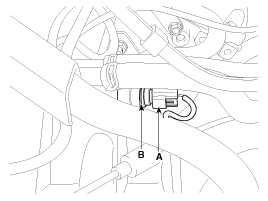
Disconnect the engine coolant temperature sensor connector (A). |
| 4. |
Remove the spring clip (B), and then pull the sensor from the water temperature control assembly.
|

| 5. |
Supplement the engine coolant.
(Refer to Engine Mechanical System - "Coolant") |
| Installation |
|
|
|
| 1. |
Install in the reverse order of removal.
|
Circuit Diagram
Description Crankshaft Position Sensor (CKPS) detects the crankshaft position and is one of the most important sensors of the engine control system.
Other information:
Kia Cadenza YG 2016-2021 Service Manual: Repair procedures
Removal 1. Remove the trunk trim in the trunk after removing the screws and clips. (Refer to Body - "Trunk") 2. Remove the camera holder (A) as shown arrow direction, and then remove the back view camera (B). Installation 1. Install the back view camera and camera holder.
Kia Cadenza YG 2016-2021 Service Manual: Cluster ionizer Description and Operation
Description 1. The function of cluster ion generator is cleaning air by sterilizing and dissolving of air conditioner. 2. The function of cluster ion generator is controlling mold caused by stench of air conditioner and external inflow of air.
Categories
- Manuals Home
- Kia Cadenza Owners Manual
- Kia Cadenza Service Manual
- Emission Control System
- Automatic Transaxle System
- Battery Troubleshooting
- New on site
- Most important about car

Copyright © 2026 www.kcadenzavg.com - 0.0233