
Kia Cadenza YG: Bumper / Front Bumper Repair procedures
Kia Cadenza YG 2016-2021 Service Manual / Body (Interior and Exterior) / Bumper / Front Bumper Repair procedures
| Replacement |
|

| 1. |
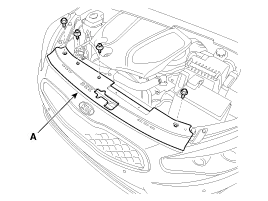
After loosening the mounting bolts, then remove the engine room air duct (A).
|

| 2. |
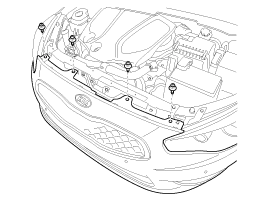
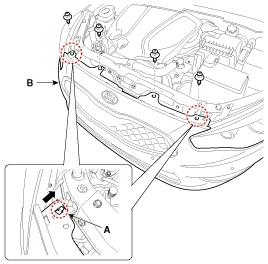
After loosening the mounting bolts and clips, then remove the radiator grill upper guide (A).
|
| 3. |
Remove the front bumper upper side mounting clips.
|
| 4. |
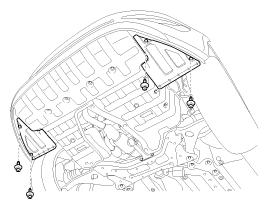
Remove the front bumper lower side mounting clips.
|
| 5. |
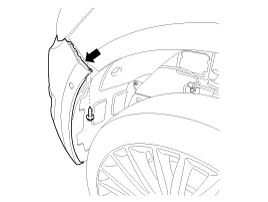
After loosening the front bumper side''s mounting screw, then disconnect the side''s.
|

| 6. |
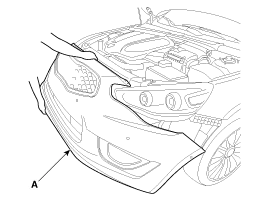
Remove the front bumper cover.
|
| 7. |
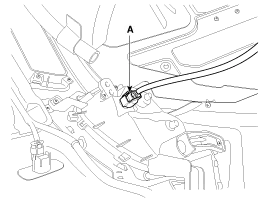
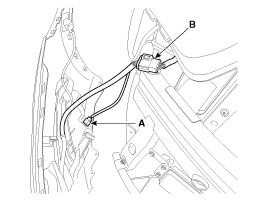
Disconnect the fog lamp connector (A) and front bumper main connector (B).
[LH]
[RH]
|
| 8. |
Installation is the reverse of removal.
|
Components(1) 1. Front bumper cover2. Front bumper upper weatherstrip3. Radiator grill upper guide4. Front bumper side bracket [LH]5. Front bumper side bracket [RH] Components(2) 1.
Components(1) 1. Rear bumper cover2. Rear bumper side bracket [RH]3. Rear bumper side bracket [LH]4. Tail trim cover Components(2) 1. Rear bumper beam assembly2.
Other information:
Kia Cadenza YG 2016-2021 Service Manual: Components and Components Location
C
Kia Cadenza YG 2016-2021 Service Manual: Repair procedures
Teaching Procedures 1. Key Teaching Procedure Key teaching must be done after replacing a defective PCM(ECM) or when providing additional keys to the vehicle owner. The procedure starts with an PCM(ECM) request for vehicle specific data (PIN code: 6digits) from the tester.
Categories
- Manuals Home
- Kia Cadenza Owners Manual
- Kia Cadenza Service Manual
- Body (Interior and Exterior)
- Brake System
- Body Electrical System
- New on site
- Most important about car

Copyright © 2026 www.kcadenzavg.com - 0.0401