
Kia Cadenza YG: Automatic Transaxle Control System / Shift Cable Repair procedures
Kia Cadenza YG 2016-2021 Service Manual / Automatic Transaxle System / Automatic Transaxle Control System / Shift Cable Repair procedures
| Removal |
| 1. |
Remove the center console assembly.
(Refer to Body - "Console") |
| 2. |
Remove the duct (A).
|

| 3. |
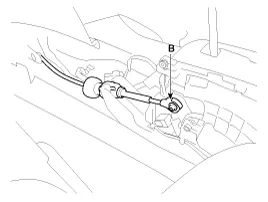
Remove the control cable (B).
|
| 4. |
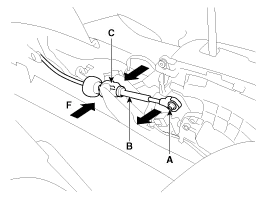
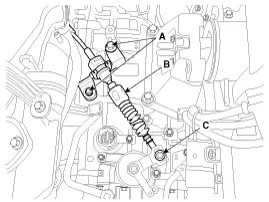
Disconnect the shift cable (A) and then remove the shift
cable (B) after pressing the shift cable socket (C) in the direction of
"F".
|

| 5. |
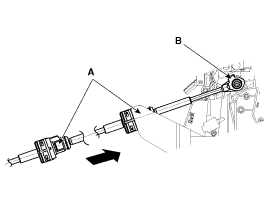
Remove the control cable assembly in the vehicle after removing the nuts (B) and the retainer (A).
|
| 6. |
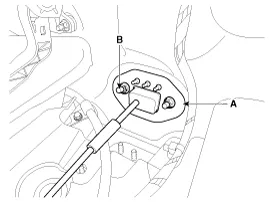
Remove the nut (C). |
| 7. |
Remove the control cable (B) after removing the nut (C) and the bolt (A).
|
| 8. |
Remove the control cable inside of cab.
|
| Installation |
| 1. |
Installation is the reverse of removal.
|
| Adjustment |
| Adjusting method for T/M control cable |
| 1. |
Make sure vehicle does not roll before setting room side
shift lever and Automatic Transaxle(AT) side manual control lever to "N"
position. |
| 2. |
Connect room side shift lever and control cable. |
| 3. |
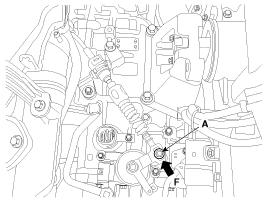
Push cable to "F" direction shown to eliminate FREE PLAY. |
| 4. |
Tighten adjusting nut (A).
|
| 5. |
After adjusting, check to be sure that this part operates as
designed at each range of Automatic Transaxle(AT) side corresponding to
each position of room lever. |
Components 1. Shift lever knob & Boots assembly2. Shift lever assembly3. Control cable assembly
Other information:
Kia Cadenza YG 2016-2021 Service Manual: Components and Components Location
C
Kia Cadenza YG 2016-2021 Service Manual: Climate Control Air Filtar Repair procedures
Replacement 1. Disconnect the damper (B) from the glove box (A) and then remove the glove box lift (C). 2. Remove the filter cover (A) with pushing the knob. 3. Replace the air filter (B), install it after making sure of the direction of air filter.
Categories
- Manuals Home
- Kia Cadenza Owners Manual
- Kia Cadenza Service Manual
- Specifications
- Body Control Module (BCM) Description and Operation
- Brake System
- New on site
- Most important about car

Copyright © 2026 www.kcadenzavg.com - 0.0219