
Kia Cadenza YG: Smart key System / Smart key unit Components and Components Location
| Component (1) |
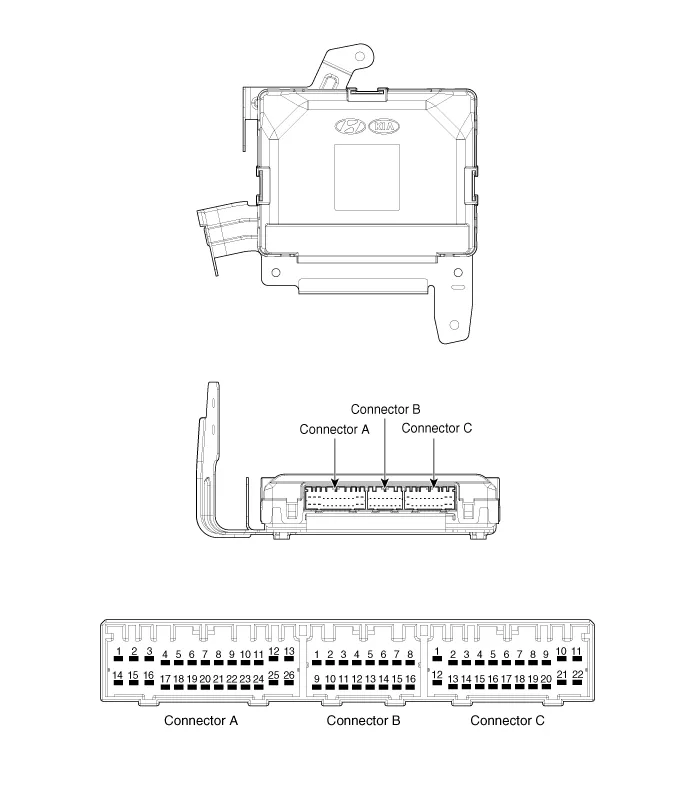
| No. | Connector A (26 pins) | Connector B (16 pins) | Connector C (22 pins) |
| 1 | VBAT load | C CAN low | SSB illumination ground |
| 2 | - | C CAN high | - |
| 3 | Power ground 1 | - | SSB LED OFF |
| 4 | IGN 1 | - | Interior antenna #2 power |
| 5 | IGN1 relay | Brake switch | Interior antenna #1 power |
| 6 | ACC | Immobilizer antenna power | - |
| 7 | IGN 2 | - | - |
| 8 | SSB switch 2 | Wheel speed | Trunk antenna power |
| 9 | - | Driver toggle button | Bumper antenna power |
| 10 | RF COM | - | Assist side antena power |
| 11 | - | - | Driver side antenna power |
| 12 | B CAN high | P position/ Clutch switch | SSB LED IGN |
| 13 | B CAN low | Start feedback | SSB illumination power |
| 14 | VBAT CPU | Immobilizer antenna ground | - |
| 15 | - | - | Interior antenna #2 ground |
| 16 | Power ground 2 | SSB LED ACC | Interior antenna #1 ground |
| 17 | Starter relay | | - |
| 18 | IGN2 relay | - | |
| 19 | ACC relay | Trunk antenna ground | |
| 20 | - | Bumper antenna ground | |
| 21 | - | Assist side antena ground | |
| 22 | - | Driver side antenna ground | |
| 23 | RPM | | |
| 24 | EMS COM | ||
| 25 | SSB switch 1 | ||
| 26 | Assist toggle button |
| Component (2) |
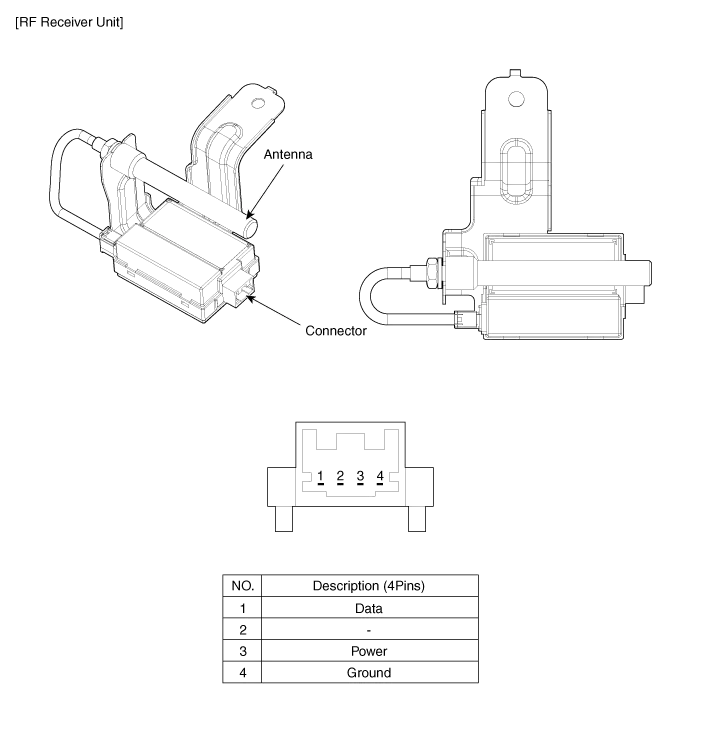
Smart Key Smart Key Code Saving 1. Connect the DLC cable of GDS to the data link connector in driver side crash pad lower panel, turn the power on GDS.
Circuit Diagram
Other information:
Kia Cadenza YG 2016-2021 Service Manual: Heater Unit Repair procedures
Replacement 1. Disconnect the negative (-) battery terminal. 2. Recover the refrigerant with a recovery/ recycling/ charging station. 3. When the engine is cool, drain the engine coolant from the radiator. 4. Remove the expansion valve cover (A).
Kia Cadenza YG 2016-2021 Service Manual: Temperature Control Actuator Repair procedures
Inspection 1. Ignition "OFF" 2. Disconnect the connector of temperature control actuator. 3. Verify that the temperature control actuator operates to the hot position when connecting 12V to the terminal 3 and grounding terminal 7. Verify that the temperature control actuator operates to the cool position when connecting in the rev
Categories
- Manuals Home
- Kia Cadenza Owners Manual
- Kia Cadenza Service Manual
- Specifications
- Schematic Diagrams
- Body Control Module (BCM) Description and Operation
- New on site
- Most important about car
