
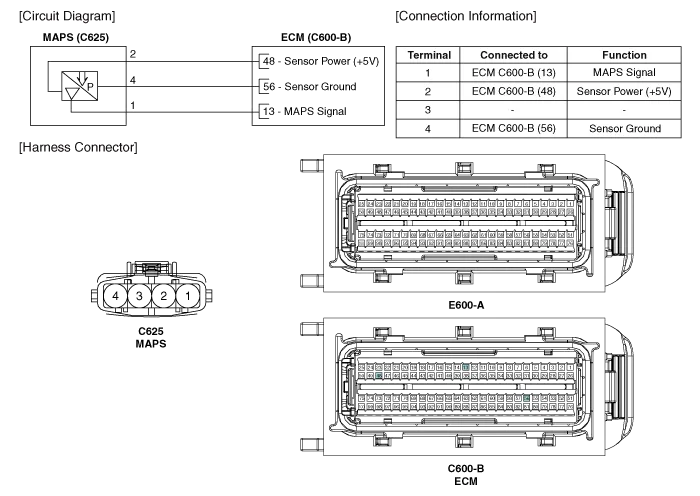
Kia Cadenza YG: Engine Control System / Manifold Absolute Pressure Sensor (MAPS) Schematic Diagrams
Kia Cadenza YG 2016-2021 Service Manual / Engine Control / Fuel System / Engine Control System / Manifold Absolute Pressure Sensor (MAPS) Schematic Diagrams
| Circuit Diagram |
Specification Pressure [kPa (kgf/cm², psi)]Output Voltage (V)20.0 (0.20, 2.90)0.7946.66 (0.47, 6.77)1.84101.32 (1.03, 14.7)4.0
Inspection 1. Connect the GDS on the Data Link Connector (DLC). 2. Measure the output voltage of the MAPS at idle and IG ON. ConditionOutput Voltage (V)IG ONApprox.
Other information:
Kia Cadenza YG 2016-2021 Service Manual: Immobilizer Control Unit Repair procedures
Removal 1. Disconnect the negative (-) battery terminal. 2. Remove the crash pad lower panel. (Refer to Body - "Crash Pad") 3. Disconnect the 5P connector of the SMARTRA unit and then remove the SMARTRA unit (A) after loosening the bolt. Installation 1.
Kia Cadenza YG 2016-2021 Service Manual: Components and Components Location
C
Categories
- Manuals Home
- Kia Cadenza Owners Manual
- Kia Cadenza Service Manual
- Schematic Diagrams
- Emission Control System
- Body Control Module (BCM) Description and Operation
- New on site
- Most important about car

Copyright © 2026 www.kcadenzavg.com - 0.0291