
Kia Cadenza YG: ESC(Electronic Stability Control) System / Front Wheel Speed Sensor Repair procedures
Kia Cadenza YG 2016-2021 Service Manual / Brake System / ESC(Electronic Stability Control) System / Front Wheel Speed Sensor Repair procedures
| Removal |
| 1. |
Remove the front wheel and tire.
|
| 2. |
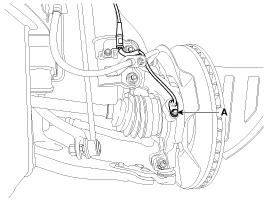
Remove the front wheel speed sensor mounting bolt (A).
|
| 3. |
Remove the front wheel guard . |
| 4. |
Remove the front wheel speed sensor cable mounting bolt. |
| 5. |
Disconnect the front wheel speed sensor connector, then remove the front wheel speed sensor. |
| 6. |
Installation is the reverse of removal. |
| Inspection |
| 1. |
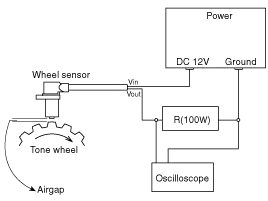
Measure the output voltage between the terminal of the wheel speed sensor and the body ground.
|

| 2. |
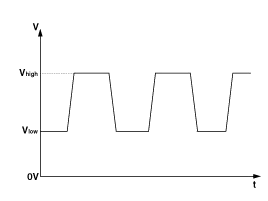
Compare the change of the output voltage of the wheel speed sensor to the normal change of the output voltage as shown below.
|
Components 1. Front wheel speed sensor2. Front wheel speed sensor connector
Components 1. Rear wheel speed sensor 2. Rear wheel speed sensor cable
Other information:
Kia Cadenza YG 2016-2021 Service Manual: Auto Head lamp leveling Unit Repair procedures
Removal Height Sensor 1. Remove the height sensor connector (A). 2. Loosen the mounting bolts(Body: 2EA, chassis: 1EA) from height sensor bracket. Tightening torque : 3 ~ 5N.m (30 ~ 50kgf.m, 2.21 ~ 3.68lb-ft) 3. Remove the height sensor.
Kia Cadenza YG 2016-2021 Service Manual: Condenser Repair procedures
Inspection 1. Check the condenser fins for clogging and damage. If clogged, clean them with water, and blow them with compressed air. If bent, gently bend them using a screwdriver or pliers. 2. Check the condenser connections for leakage, and repair or replace it, if required.
Categories
- Manuals Home
- Kia Cadenza Owners Manual
- Kia Cadenza Service Manual
- Crankshaft Damper Pulley Components and Components Location
- Brake System
- Schematic Diagrams
- New on site
- Most important about car

Copyright © 2026 www.kcadenzavg.com - 0.0307