
Kia Cadenza YG: Seat Electrical / Power Seat Motor Repair procedures
Kia Cadenza YG 2016-2021 Service Manual / Body Electrical System / Seat Electrical / Power Seat Motor Repair procedures
| Inspection |
Power Seat Motor
| 1. |
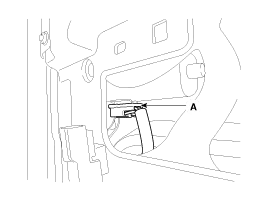
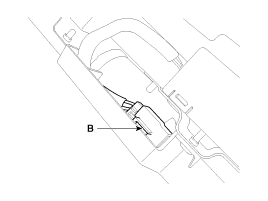
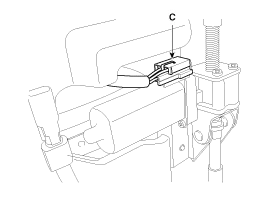
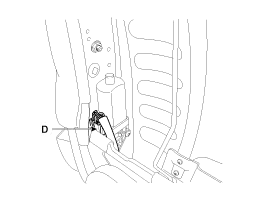
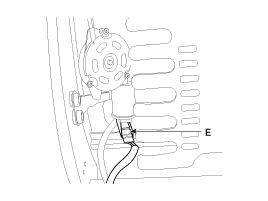
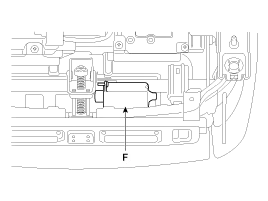
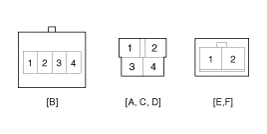
Disconnect the connectors for each motor.
A : Front height motor
B : Slide motor
C : Rear height motor
D : Recline motor
E : Lumber support motor
F : Cushion extension motor
|
| 2. |
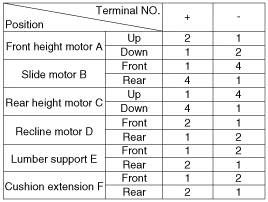
With the battery connected directly to the motor terminals, check if the motors run smoothly. |
| 3. |
Reverse the connections and check that the motor turns in reverse. |
| 4. |
If there is an abnormality, replace the motors.
|
Component Location 1. Slide motor2. Front height motor3. Rear height motor4. Lumber support motor5. Power seat control switch6. Recline motor7. Recline control switch8.
Circuit Diagram
Other information:
Kia Cadenza YG 2016-2021 Service Manual: Adaptive Front Lighting System Repair procedures
Removal 1. Disconnect the negative (-) battery terminal. 2. Using a screwdriver or remover, remove the crash pad side cover (A). [RH] 3. Disconnect the stopper (B) from the glove box (A). 4. Disconnect the air damper (A) from the glove box (B).
Kia Cadenza YG 2016-2021 Service Manual: Refrigerant line Repair procedures
Replacement 1. Discharge refrigerant from refrigeration system. 2. Replace faulty tube or hose. Cap the open fittings immediately to keep moisture or dirt out of the system. 3. Tighten joint of bolt or nut to specified torque.
Categories
- Manuals Home
- Kia Cadenza Owners Manual
- Kia Cadenza Service Manual
- Engine Mechanical System
- Body (Interior and Exterior)
- Engine Control / Fuel System
- New on site
- Most important about car

Copyright © 2026 www.kcadenzavg.com - 0.0299