
Kia Cadenza YG: Auto Lighting Control System / Schematic Diagrams
Kia Cadenza YG 2016-2021 Service Manual / Body Electrical System / Auto Lighting Control System / Schematic Diagrams
| Circuit Diagram |
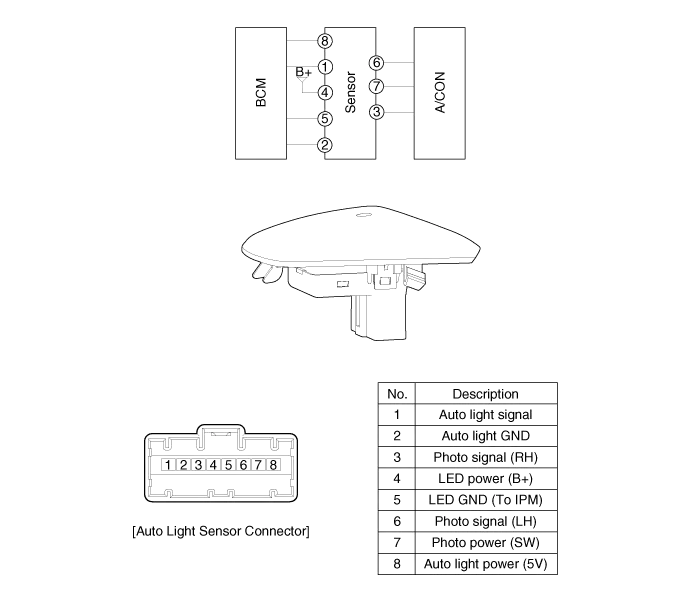
Component Location 1. Auto light sensor2. Head lamps3. Lighting switch (Auto)4. Tail lamps5. IPM (Intelligent intergrated Platform Module)
Inspection Lighting Switch Inspection With the multi function switch in each position, make sure that continuity exists between the terminals below.
Other information:
Kia Cadenza YG 2016-2021 Service Manual: Components and Components Location
C
Kia Cadenza YG 2016-2021 Service Manual: Intake Actuator Repair procedures
Inspection 1. Ignition "OFF". 2. Disconnect the intake actuator connector. 3. Verify that the actuator operates to the recirculation position when connecting 12V to the terminal 3 and grounding terminal 7. 4. Verify that the intake actuator operates to the fresh position when connecting in the reverse.
Categories
- Manuals Home
- Kia Cadenza Owners Manual
- Kia Cadenza Service Manual
- Components and Components Location
- Specifications
- Body Control Module (BCM) Description and Operation
- New on site
- Most important about car

Copyright © 2026 www.kcadenzavg.com - 0.0241